Building a personal finance tracker with Claude

~6 min read
My wife and I share money the way most couples do: with very poor documentation. Some things are hers, some are mine, and some are ours—but not necessarily 50/50. At one point, a wedding, an apartment renovation, and a six-week trip to Montreal were all happening at once. Records arrived as PDF statements, screenshots of credit card bills, photos of Pix receipts—Pix is Brazil’s instant payment system—or me saying out loud, “I paid R$700 for the dress fitting.”
Before we lived together, the only thing we tried to track was travel. We used split-the-bill apps, usually a different one for every trip. None of them stuck.
Bookkeeping was my job, and I always did it after the fact: reconstructing a week of taxis and dinners from memory and a pile of receipts, then entering everything days later into an app designed for expenses to be recorded as they happened. When we decided to move in together, the stakes got higher, so I moved the whole process to spreadsheets.
Spreadsheets rot too, for the same reason. The boring part isn’t the math—it’s transcribing forty rows from a credit card statement and deciding who each one belongs to.
So I started over with the dumbest possible system. Inspired by ledger-cli—plain text as the system of record, with no app and no database—I created a folder of Markdown files and a single text file telling Claude how to fill them in.
That system lasted a few weeks before it broke too. The transcription problem was solved; the math problem wasn’t. Asking an LLM to add up hundreds of rows means spending thousands of tokens on grade-school arithmetic and then checking every number it produces, every week. Money math needs to be deterministic and repeatable.
So I wrote a CLI to own the math. Ten weeks later, that folder of Markdown files has its own tool—and 86 tests.
In a rush? Go ahead and test it out: https://github.com/thiagodiniz/spltty
If you are more curious about how the project evolved, one iteration at a time. keep reading
First iteration: plain files and one instruction file
I added a CLAUDE.md containing the overall instructions, plus one file holding the expenses and a few notes.
The first expense table looked like this:
| Date       | Title | Value (R$) | Responsible | Source |
|------------|-------|-----------:|-------------|--------|
That’s it. I dropped in a screenshot of a card bill, and Claude extracted 38 rows, confirming each one with me before writing it to the file.
At the time, I wasn’t building an app. I was documenting the shape of the data and the rules for filling it. Everything that came after was a refinement of that shape.
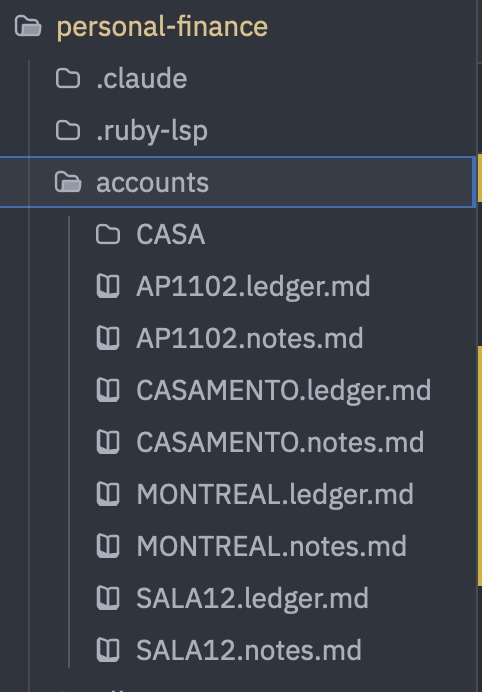 *The whole system: Markdown ledgers*
Second iteration: real money broke the schema
Two weeks in, the schema started to fall apart in ways I could only discover by using it.
“Responsible” was doing two jobs. When a row said Camila, did that mean she paid for it or that she owed it? Those are different facts, and settlements are impossible without both. So it became two columns: Paid By, for the person who fronted the money, and Responsible, for the person who bears the cost.
One ledger wasn’t enough. The renovation, the wedding, the rental unit, and the trip weren’t “monthly expenses.” They were projects with their own lifespans and split rules. So accounts/ got one ledger per project.
Currency conversion complicated everything. The trip was where things got interesting. We were spending in Canada and the US, so transactions arrived in CAD and USD but had to be stored in BRL, with the original amount preserved alongside them. The exchange rate used by a Brazilian credit card can also differ from the rate on the day of the purchase, so we had to track where and how each payment was made.
Third iteration: the moment talking wasn’t enough
After a month or so, the ledgers contained a few hundred rows, and I asked the obvious question: who owes whom?
Claude could add everything up, but an LLM doing arithmetic over hundreds of rows is something you have to check. Rechecking it every week is worse than doing it yourself.
So, with Claude’s help, I wrote scripts/totals.py: a script that could parse any ledger from its table header, apply the relevant splits, and print the totals for each person.
Later, I became curious about how much that change had actually saved. I ran both approaches against the ledgers as they exist today: 457 rows across three ledgers, resolved into one combined settlement. Same model, same machine, same question.
| Tokens in | Tokens out | Wall clock | Cost | |
|---|---|---|---|---|
CLI + LLM (spltty totals --combined) |
~200 | 310 | 8s | $0.18 |
| LLM only, reading every row | 67,709 | 22,571–25,563 | ~3m 20s | $0.63–$1.00 |
The CLI path sent roughly 200 input tokens: a 738-character summary produced by the command. The LLM-only path sent all 67,709 tokens from the ledger tables themselves. The ranges in the final row come from three separate runs.
And here’s the part I didn’t expect: the model got it right.
All three LLM-only runs matched the CLI to the cent: R$17,930.52.
So this isn’t a story about the model being bad at arithmetic. It’s that roughly 73–82 times more output tokens and 25 times more wall-clock time still buy me a number I have to verify against something, every week, forever.
“It was right the last three times” is not a property you can build a settlement system on.
Now I let AI handle the fuzzy work—reading a blurry receipt or identifying that MOMENTOS BUFFET E RECE is probably the wedding caterer—and give the exact work to code.
Fourth iteration: the CLI
On July 5, I replaced the script with a real tool: spltty, a Ruby CLI. Not because Python was wrong, but because Ruby is my favourite language.
The problem was no longer computing the totals. It was that rows were still being written by hand—or, more accurately, by Claude editing Markdown—and hand-written rows drift. Dates become inconsistent, columns become misaligned, and tokens get burned on work that is really just data entry.
Here’s what spltty fixed:
addwrites the row. Column alignment, card defaults, and bill-date stamping are all mechanical, so they now live in code.CLAUDE.mdexplicitly says never to edit a ledger table by hand.groupsreplaced string parsing.Bothis no longer a magic word. It is a named group:{Thiago: 50, Camila: 50}globally, while the wedding ledger defines its ownBothgroup at 65/35, which overrides the global definition. Adding a third participant is now a configuration change, not a parser change.totalsthe script moved in to the commmandspltty totals.settlerecords a payment as an actual ledger row, with the debtor as Paid By and the creditor as Responsible. That payment then offsets the debt in every future calculation.- Configuration lives in the notes files. Each ledger’s YAML header contains its own settings and groups. These are kept in two-way sync with
config.json, with the most recently modified file taking precedence. I can edit either side. - Tests. There are 86 of them. This is what makes it safe to let an AI continue changing the tool.
Finally, the loop closed: the ingestion workflow itself became an /ingest skill. “Here’s a screenshot, deal with it” is now a documented procedure instead of something I have to re-explain in every session.
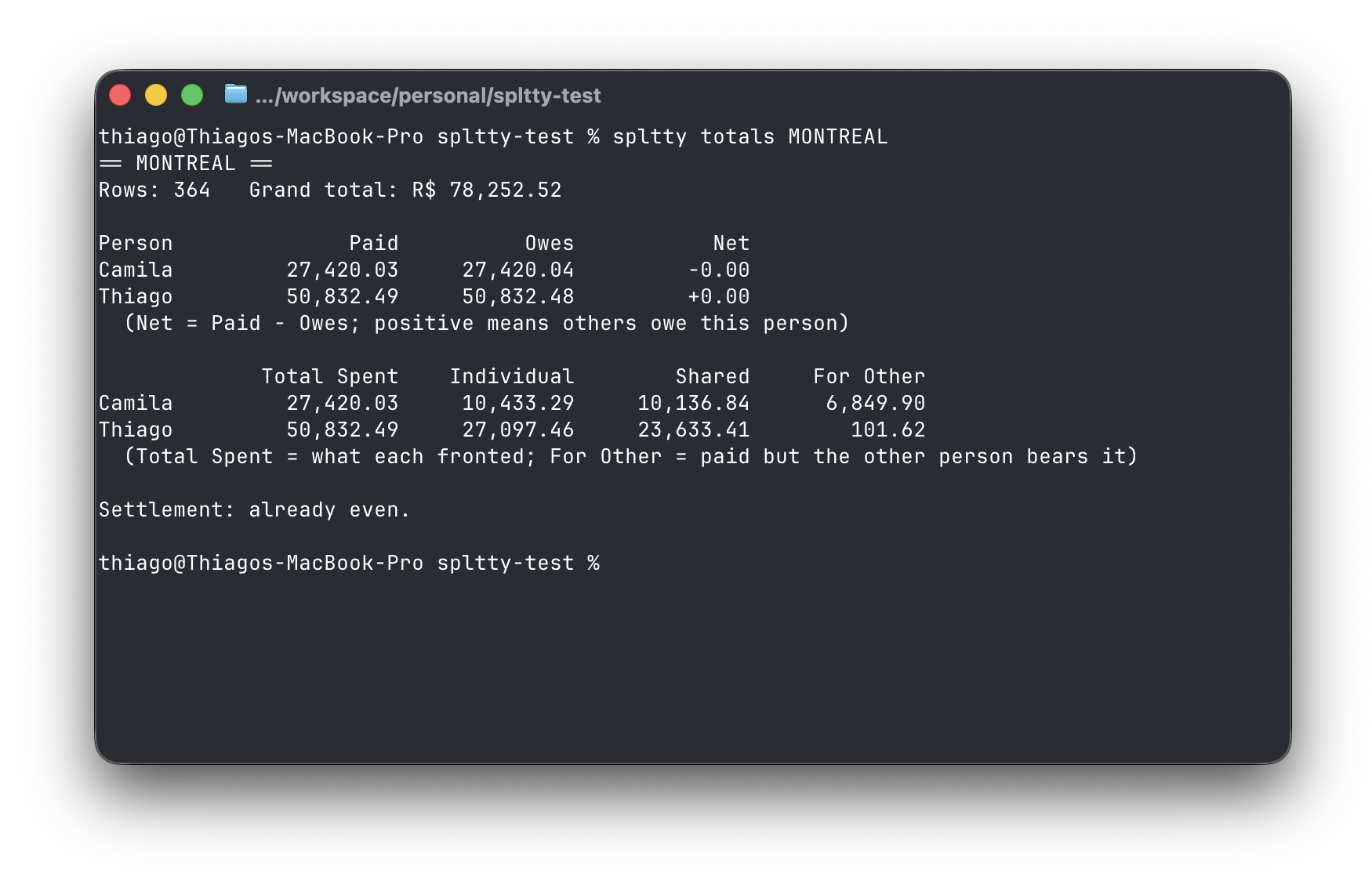 Ten weeks of receipts, one number at the bottom.
Try it: the commands worth learning first
# What ledgers exist? This also reconciles config with the notes headers.
spltty list

# Add an expense. The title is positional; everything else is a flag.
spltty add "Leite 1L" -l CASA -v 14.20 -p Thiago -m cash -r Both

# Name a card once, and Paid By, Responsible, and bill date are filled automatically.
spltty methods add "Mastercard 9759" -s mc-9759 -p Thiago -r Both -b last
spltty add "Extra" -l CASA -v 66.69 -m mc-9759 -y

# Define how a split works, either per ledger or globally.
spltty groups add Both -s Thiago:65,Camila:35 -l CASAMENTO
spltty groups add Both -s Thiago:50,Camila:50 --global

# See who owes whom, either per ledger or across all of them.
spltty totals
spltty totals --combined

# Record the payment so it offsets the debt from this point onward.
spltty settle CASA
The -y flag skips the confirmation prompt. That’s what Claude passes after it has collected every required field. Without it, you get an interactive confirmation, which is worth using for your first few entries.
Give it a try, and tell me how it goes
spltty now lives on its own. Pick whichever installation method you prefer:
brew install thiagodiniz/spltty/spltty
gem install spltty
curl -fsSL https://raw.githubusercontent.com/thiagodiniz/spltty/main/install.sh | sh
Then point it at an empty folder:
mkdir ~/finances && cd ~/finances
spltty install
The system is still what I wanted in the beginning: a folder of plain-text files that I can inspect, edit, and keep forever. Claude handles the ambiguous input, while the CLI enforces the structure and owns the math.
That division of labour turned out to be the whole project.